
Adding the treatments and services you offer is easy and quick to do using Connect.
How can I add a new service to my menu?
Go to ‘Menu’ in the web version of Connect.
Click ‘Add new...’ on the right-hand side, then ‘Service’ in the pop-up box.
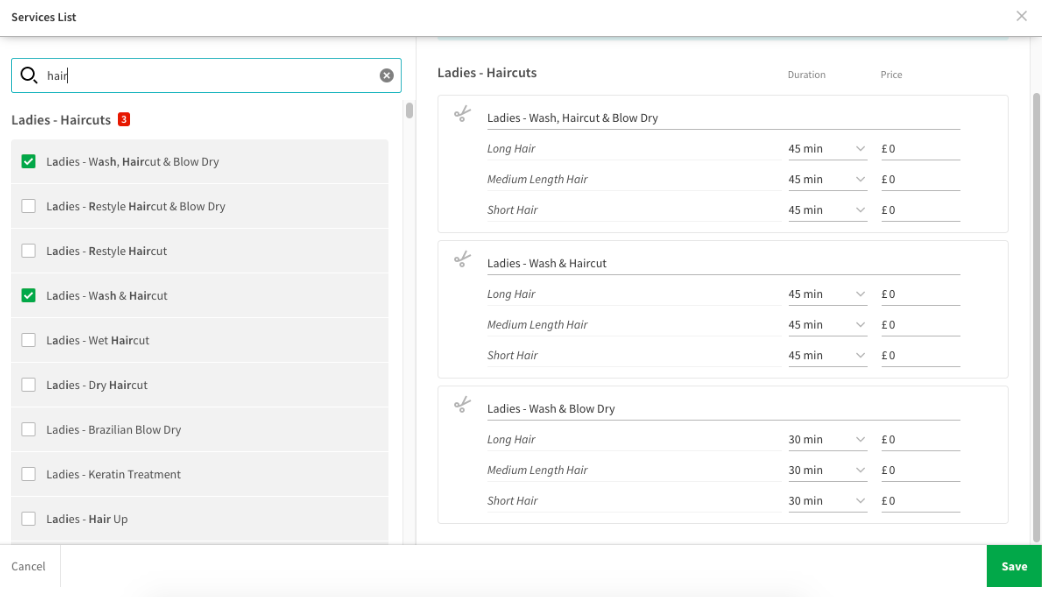
Type in the search box, browse through the list that appears – and click on the services you want to add.
Adjust the name, the duration of the treatments, and add in prices (you can add sales prices later to attract more clients).
Then, select which members of your team perform each treatment.
When you’re happy, click ‘Save’.
You'll now see the services on your menu, with a yellow 'New' icon next to each one. If you want to move the service, hover over the scissors to the left of its name, then click and drag it up or down.
Important: After you've added the services initially, you'll need to go back and add any processing time, clean-up time, restrictions, and a treatment description.
Was this article helpful?