
You may want to offer services on certain days of the week or for a limited period of time. Whether that’s because you only have the resources for that treatment on certain days, or want to create a special offer, Connect makes it easy to do – meaning you don't need to remember to take the service offline yourself.
How do I make a service available on certain days of the week?
Go to your menu in Connect and click on the service
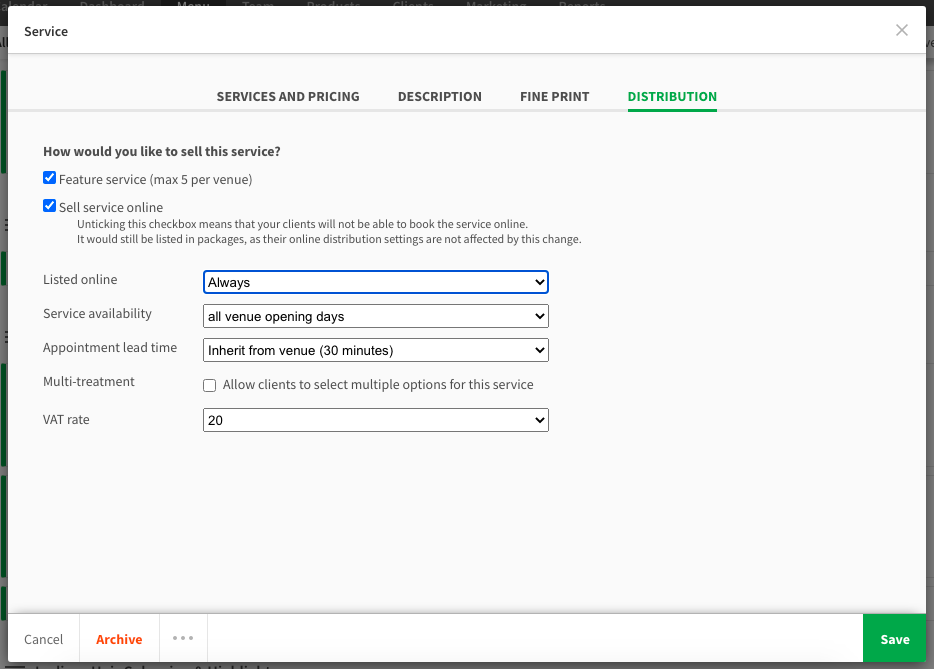
Go to the "Distribution" tab
Click on the dropdown next to "Service availability" and then select "on these weekdays"
Untick the days when the service is not available
Click "save" when you’re happy
Note that the service will continue to appear on your menu every day, but appointments are only available on the days you’ve chosen.
How do I make a service available temporarily?
Go to your menu in Connect and click on the service
Go to the "Distribution" tab
Click on the dropdown next to "Listed online"
You can choose between "From", "Until" and "Range" and then select the dates you want
Click "save" when you’re happy
The time frame you choose determines when the service is visible on your menu, not when bookings can take place. This means customers can make a booking for a date outside of the range you’ve selected.
You can easily see the availability of the temporary services from your menu in Connect - they’ll appear with an end date next to their name.
Was this article helpful?